Official links only · Updated October 2026
E-Challan Check Online: PSCA Challan, Vehicle and Owner Record Checks
Do your e-challan check online in under a minute on the official PSCA portal. Enter the vehicle number with the owner's CNIC or chassis number, and every unpaid Safe City challan appears with its photo.
Each card opens an official government service in a new tab: the PSCA e-challan portal, the Excise MTMIS vehicle record and the Punjab Police service centres for a CNIC-based police record. We are an independent guide, so we never ask for your CNIC or vehicle details, and nothing you type on those portals reaches us.
On this pageShowHide
- 01What you need before an e-challan check online
- 02How to do an e-challan check online on the PSCA portal
- 03Check and download e-challans in the PSCA Public Safety app
- 04How to download or print your e-challan
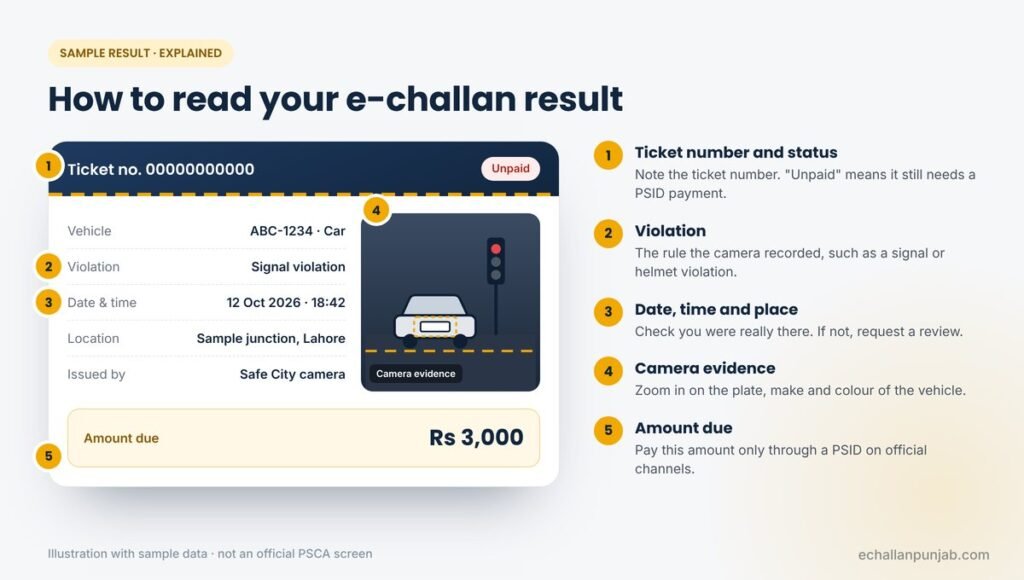
- 05What your e-challan check result means
- 06E-challan check by CNIC, vehicle number or chassis number
- 07Vehicle record check before you buy a car or bike
- 08Owner criminal record check by CNIC: the official route
- 09E-challan check online not working? Quick fixes
- 10Stay safe while you check
- 11Related guides
- 12Frequently asked questions
- 13Run your e-challan check online now
What you need before an e-challan check online
Most failed attempts at an e-challan check online come down to one wrong character, so it pays to have the right document open first. You need two details, and both must match the Excise record for the vehicle.
| Detail | Where to find it | Tip |
|---|---|---|
| Vehicle registration number | Registration book or smart card, and the number plate | Copy the letters and digits exactly; spaces and dashes rarely matter, letters do |
| Owner's CNIC number | The registered owner's CNIC (not the driver's) | Enter all 13 digits without dashes |
| Chassis number (alternative) | Registration book, and stamped on the vehicle body | Best for company vehicles or cars still in a previous owner's name |
In other words, the search is built around the vehicle, not the person. For that reason, a CNIC alone cannot list every challan linked to you; you need to check each vehicle separately.
How to do an e-challan check online on the PSCA portal
The official portal is the only place that shows the live record. It works in any browser, so you do not need to install anything.
-
Open the real address
Type echallan.psca.gop.pk yourself rather than tapping a link in a message. Look-alike sites copy the design to collect card details.
-
Enter the vehicle number
Use the format on your registration book. If you own a motorcycle and a car, run a separate search for each.
-
Add the CNIC or chassis number
Use the registered owner's CNIC. If the vehicle is still in a previous owner's name, switch to the chassis number instead.
-
Complete the captcha
Tick "I'm not a robot". If the box keeps reloading, refresh the page or try another browser.
-
Read every challan
Open each result and check the photo before you pay. Write down the ticket number for your records.
Check and download e-challans in the PSCA Public Safety app
If you run an e-challan check online often, the official PSCA – Public Safety app is the most convenient route. PSCA publishes it on Google Play and the Apple App Store, and its e-challan section lets you check, download and manage your traffic challans.
The same app also carries the Police 15 emergency button and complaint tracking. Download it only from the official store listing, where the developer is shown as Punjab Safe Cities Authority.
Online challan check ka tarika (Roman Urdu)
- Browser mein echallan.psca.gop.pk kholein, ya PSCA Public Safety app install karein.
- Gari ya bike ka number registration book ke mutabiq likhein.
- Owner ka CNIC (13 hindsay, dash ke baghair) ya chassis number darj karein.
- Captcha tick kar ke Search dabayein aur har challan ki tasveer check karein.
How to download or print your e-challan
A saved copy helps when you need to show proof to a buyer, an employer or a traffic warden. Fortunately, you can keep one in under a minute.
- On the portal: open the challan, then use your browser's Print option and choose "Save as PDF".
- In the app: open the challan in the e-challan section and use the download option.
- After paying: save the PSID and the bank or wallet receipt with the challan. Together, they settle any later dispute.
Keep these files until the portal shows the challan as paid. After that, a screenshot of the cleared record is useful when you sell the vehicle.
What your e-challan check result means
Every search ends in one of a few outcomes. The table explains what each one means and what to do next.
| What you see | What it means | What to do |
|---|---|---|
| No record found | Usually no unpaid challan on that vehicle | Re-check the details; search again in one to three days if you received an SMS |
| One or more unpaid challans | A camera recorded a violation | Check the photo, then pay with a PSID or request a review |
| Paid challan still shows as unpaid | The payment has not synced yet | Wait 48 hours, then contact your bank with the transaction ID |
| A challan you do not recognise | Possible plate misread or cloned plate | Request a review with evidence on the official portal |
| An SMS, but nothing on the portal | A new challan, or a fake message | Wait a day or two; if nothing appears, treat the SMS as a scam |
If the challan is genuine, our guide on how to pay a PSCA e-challan online walks you through the PSID. If it is wrong, follow our steps to cancel a wrong e-challan.
E-challan check by CNIC, vehicle number or chassis number
People often search for an "e-challan check by CNIC" as if it were a separate service. In practice, the portal combines the details, so the real choice is between the CNIC and the chassis number as your second field.
| Your situation | Use this | Why |
|---|---|---|
| The vehicle is registered in your name | Vehicle number + your CNIC | Fastest, and you have both details to hand |
| You bought it on an open letter | Vehicle number + chassis number | The CNIC on record still belongs to the seller |
| Company or government vehicle | Vehicle number + chassis number | There is no personal CNIC on the record |
| Checking a car before you buy it | Vehicle number + chassis number from the seller | Lets you confirm unpaid challans without the seller's CNIC |
Bikes, cars, rickshaws and commercial vehicles all use the same search. The only difference is the registration number you enter.
Vehicle record check before you buy a car or bike
Many buyers search for a "vehicle criminal record check". However, no public online tool in Punjab shows police cases against a vehicle. Instead, three official checks together give you a reliable picture before you pay.
-
Verify the registration on MTMIS
On the Excise and Taxation Department's MTMIS Punjab portal, enter the number to see the owner's name, engine number, colour, year of manufacture and token tax status. You can also SMS the number to 8785.
-
Run an e-challan check
Search the vehicle on the PSCA portal. Ask the seller to clear any unpaid challans before transfer, because they stay with the vehicle.
-
Ask the police to verify it
Police Khidmat Markaz centres list vehicle verification among their services. Ask there, or at your local police station, to confirm the vehicle is not reported stolen.
Match these before you pay
- The engine and chassis numbers on the body match the registration book
- The seller's CNIC matches the owner's name on MTMIS
- Token tax is paid and no e-challans are pending
- The number plate is an official, security-featured plate
For a fuller walk-through of registration checks, see our related guide to vehicle verification with MTMIS.
Owner criminal record check by CNIC: the official route
Searches such as "criminal record check online by CNIC Punjab" are common. Yet no government website lets anyone type a CNIC and view a person's criminal record, and for good reason: that data is private.
What you can do is obtain your own record, in the form of a Police Character Certificate. Punjab Police issue it through Police Khidmat Markaz (PKM) centres, and you can apply at any PKM in the province, not only in your home district.
| Item | Details |
|---|---|
| Documents | Original CNIC (or B-Form) and copy, original passport and copy, and an affidavit |
| Fee | Rs 350, paid at the PKM counter |
| Processing time | About 3 working days |
| Delivery | By courier; you can track the application on the PKM portal |
| Living abroad? | Apply through PKM Global via a Pakistani embassy, or a blood relative can apply with your authority letter |
Beware of "instant criminal record" websites
Any site that promises a criminal record from a CNIC in seconds is not official. Do not enter your CNIC there. Use the PKM portal or visit a Police Khidmat Markaz instead.
In August 2026, the federal government also approved a centralised online system for police clearance certificates through the National Police Bureau. Until its portal is announced, Punjab residents should keep using PKM.
E-challan check online not working? Quick fixes
- Captcha keeps reloading: turn off any VPN or data saver, then refresh the page.
- The page loads slowly: the portal can be busy at peak times, so try again a little later or switch between Wi-Fi and mobile data.
- "Record not found" every time: compare each letter of the number with the registration book, then try the chassis number.
- Results look cut off on a phone: rotate the screen or use the desktop view in your browser.
If nothing works, the PSCA Public Safety app offers the same e-challan check as the website, so it makes a good backup.
Stay safe while you check
A genuine e-challan check online never asks for card details, a PIN or an OTP. Likewise, PSCA sends e-challan messages only from 9915, and those messages contain no link. If something feels wrong, close the page and type the official address yourself.
Our homepage explains how to tell a real e-challan SMS from a fake in more detail, and what to do if you already shared your details.
Frequently asked questions
Is the e-challan check online free?
Yes. Checking on echallan.psca.gop.pk or in the PSCA Public Safety app costs nothing. You only pay the fine itself, through a PSID.
Can I check an e-challan by CNIC only?
No. The portal needs the vehicle number together with the CNIC or chassis number. If you own several vehicles, search each one separately.
Can I check someone else's vehicle?
Yes, if you have the vehicle number and either the owner's CNIC or the chassis number. That is why buyers ask the seller for the chassis number before a sale.
How do I download my e-challan?
Open the challan on the portal and save it as a PDF from your browser's Print option, or use the download option in the PSCA Public Safety app.
Why does the portal show "no record found"?
Usually there is simply no unpaid challan. Otherwise, a detail may be mistyped, the CNIC may belong to a previous owner, or a new ticket may still be on its way to the portal.
Can I check Islamabad or motorway challans here?
No. The PSCA portal covers Punjab Safe City cameras only. Islamabad Traffic Police and the National Highways and Motorway Police run their own systems.
Is there an online vehicle criminal record check in Punjab?
Not as a public tool. Instead, verify the registration on MTMIS, run an e-challan check and ask a Police Khidmat Markaz or police station to confirm the vehicle is not reported stolen.
How do I get a criminal record check by CNIC?
Apply for your own Police Character Certificate at any Police Khidmat Markaz in Punjab. Lahore Police list the fee as Rs 350 and the processing time as about three working days.
Is echallanpunjab.com the official PSCA website?
No. We are an independent guide. Every card and button on this page opens the official government service.
Run your e-challan check online now
A monthly e-challan check online keeps surprises small and protects your licence. So open the official portal, enter your details carefully and check every photo before you pay. When you buy a vehicle, add the MTMIS and police checks as well.
Sources we checked for this page
- PSCA – Public Safety app on Google Play (updated 15 June 2026)
- PakWheels: How to check and pay an e-challan in Pakistan (December 2025)
- ProPakistani: How to verify vehicle ownership on MTMIS Punjab
- Punjab Police: Police Khidmat Markaz services
- Lahore Police: Police Character Certificate
- Punjab Police: PKM Global for overseas Pakistanis
- ARY News: Online police character certificate system approved (5 August 2026)
- Dawn: PSCA warns of fake e-challan messages (14 March 2026)