Disputes · Updated October 2026
How to Cancel a Wrong E-Challan from Home
You can cancel a wrong e-challan without visiting any office. PSCA's online review lets you upload evidence against a ticket, and a challan found to be wrong is cancelled within 24 hours of verification. By April 2026, more than 38,000 incorrect e-challans had already been cancelled this way.
The first card opens the official e-challan portal, and the second writes to PSCA's published complaints address. We are an independent guide, so we cannot cancel a challan for you, but the steps below give your request the best chance.
On this pageShowHide
- 01When can you cancel a wrong e-challan?
- 02Before you start: check the e-challan evidence
- 03How to cancel a wrong e-challan online, step by step
- 04Email PSCA about a wrong e-challan
- 05Cloned number plates: extra steps
- 06Sold your vehicle? Stop wrong e-challans at the source
- 07Mistakes that get a review rejected
- 08Frequently asked questions
- 09Cancel a wrong e-challan the right way
- 10Related guides
When can you cancel a wrong e-challan?
The review is for genuine mistakes, not for violations you did commit. PSCA has asked people to use it only for real complaints, and a challan is upheld when the camera evidence proves the violation. So first decide honestly which situation applies to you.
| What went wrong | How it shows up | Proof that helps |
|---|---|---|
| Plate misread by the camera | The photo shows a different vehicle or a similar-looking number | Clear photos of your plate and vehicle, registration document |
| Cloned or fake number plate | Same number, but a different make, model or colour | Registration document, photos of your vehicle, a police report if you filed one |
| Vehicle sold but not transferred | The challan is real, but the buyer was driving | Sale agreement, open-letter copy, transfer application |
| Vehicle was elsewhere | Your vehicle could not have been at that place and time | Parking or toll receipts, workshop job card, dated photos |
| Wrong vehicle category | A motorcycle fined as a car, or similar | Registration document showing the category |
Before you start: check the e-challan evidence
Every PSCA e-challan comes with a camera image. For this reason, the evidence is your first stop. Open the challan on the portal and zoom in on the photo before you do anything else.
Compare these with your vehicle
- Number plate: every letter and digit, and the plate style
- Make, model and colour of the vehicle in the photo
- Date, time and location on the ticket
- Vehicle type: motorcycle, car or commercial vehicle
If the photo clearly shows your own vehicle committing the violation, a review will not succeed. In that case, pay it with a PSID instead; our guide explains how to pay an e-challan online. For help reading each field on the result, see our e-challan check online guide.
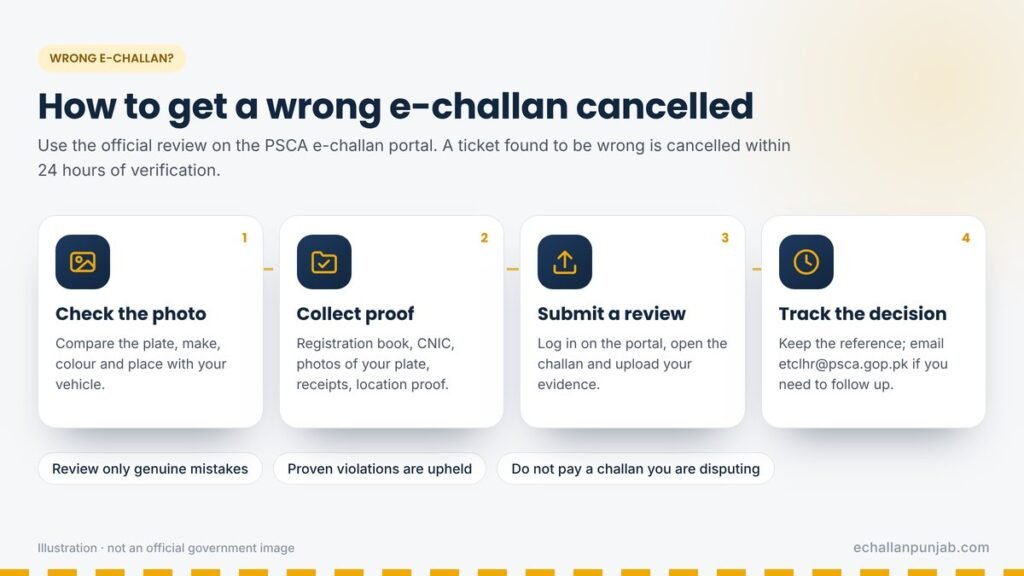
How to cancel a wrong e-challan online, step by step
PSCA's review lets citizens challenge an incorrectly issued e-challan and submit supporting evidence digitally. You only need a phone with a camera and about twenty minutes.
-
Log in on the e-challan portal
Open echallan.psca.gop.pk and sign in. Then find the challan using the vehicle number and the owner's CNIC or chassis number.
-
Open the review section
Choose the challan you want to contest and select the review option. Next, write a short, factual explanation of what went wrong.
-
Upload your evidence
Attach clear photos and documents. A photo of your number plate next to the challan image is often the strongest single piece of proof.
-
Submit and note the reference
After submitting, screenshot the confirmation. Keep the ticket number and any reference with your documents.
-
Check the decision
Search the vehicle again after a day or two. A challan found to be wrong is cancelled within 24 hours of verification and disappears from the unpaid list.
Email PSCA about a wrong e-challan
Before the online review, PSCA handled complaints by email, and the address still works as a back-up. In particular, it is useful when the portal will not load, or when you need to follow up on a review.
Write to etclhr@psca.gop.pk with a clear subject line, such as “Wrong e-challan – ticket [number] – vehicle [number]”. In the body, give the ticket number, vehicle number, date and place of the challan, and a two- or three-sentence explanation. Then attach the same evidence you would upload to the portal.
Sample email text
Subject: Wrong e-challan – ticket 00000000000 – vehicle ABC-1234
Dear PSCA team, I received e-challan 00000000000 for vehicle ABC-1234 dated 12 October 2026. The vehicle in the photo is a white hatchback, but my vehicle is a silver sedan, as shown in the attached registration document and photos. Please review and cancel the challan. Name, CNIC, mobile number.
Cloned number plates: extra steps
A cloned plate means someone else is driving a vehicle with your number. As a result, the challans will keep coming, so cancelling one wrong e-challan is not enough on its own.
- Report it to the police. A report on record makes later reviews much easier.
- Request a review for each challan. Mention the cloned plate and attach the same proof every time.
- Check your record often. Search the vehicle on the portal every week or two until the challans stop.
- Use official plates. Security-featured plates from the Excise and Taxation Department are harder to copy.
Sold your vehicle? Stop wrong e-challans at the source
E-challans go to the registered owner on the Excise record. So if you sold a vehicle on an open letter and the buyer never transferred it, new challans will still reach you.
First, ask the buyer to complete the transfer at the Excise and Taxation office, and keep a copy of the sale agreement. Afterwards, confirm the new owner's name on MTMIS Punjab. Until then, use the review with the sale documents as evidence for any challan issued after the sale.
Mistakes that get a review rejected
- Vague explanations. “This is not my challan” is not enough; say exactly what does not match.
- Blurry evidence. Photograph documents flat, in good light, with every number readable.
- Paying first. A challan is far simpler to contest before you pay it.
- Contesting a real violation. Clear camera evidence of your vehicle means the challan stands.
- Using unofficial “agents”. No one can cancel a challan for a fee; only PSCA decides.
Frequently asked questions
How long does it take to cancel a wrong e-challan?
PSCA says a challan found to be incorrect is cancelled within 24 hours of verification. Allow a few days in total, then check the portal again.
Is there a fee for an e-challan review?
No. The review on the official portal is free. Be wary of anyone who asks for money to cancel a challan.
Can I cancel a wrong e-challan by email?
You can email etclhr@psca.gop.pk with the ticket number and evidence. However, the online review is now the main route, so use the email as a back-up or to follow up.
What if my e-challan review is rejected?
Look at the camera evidence again. If you still believe it is wrong, email PSCA with any new proof, or visit a traffic police office with your documents.
Should I pay while my review is pending?
No. Wait for the decision. If the review fails, pay the challan with a PSID straight away to avoid problems at roadside checks.
Can I cancel a wrong e-challan for a vehicle in someone else's name?
Ideally, the registered owner should submit the review, because the documents are in their name. Alternatively, the owner can share the documents so you can submit on their behalf.
Cancel a wrong e-challan the right way
In short, check the camera evidence, collect clear proof and use the official review rather than paying a ticket you did not earn. Most wrong e-challans come from misread or cloned plates and unfinished transfers, and each one has a simple fix. Above all, keep your documents together, so you can cancel a wrong e-challan quickly if another one arrives.